Use · Expeditions & treks
The walkie talkie app for trekking groups and expeditions.
Keep the front and the back of the group on one channel. TapHAIL works over mobile data where there is signal, links Android phones directly over Bluetooth and Wi-Fi where there is none, and carries a field toolkit in the same app.
Before you set off
Make the expedition channel
Create a channel and share its 6-character code, a link or a QR with the group while everyone still has signal.
Allow nearby devices
On Android, allow nearby devices (Bluetooth and Wi-Fi) so phones can find each other when the network goes.
Choose who shares location
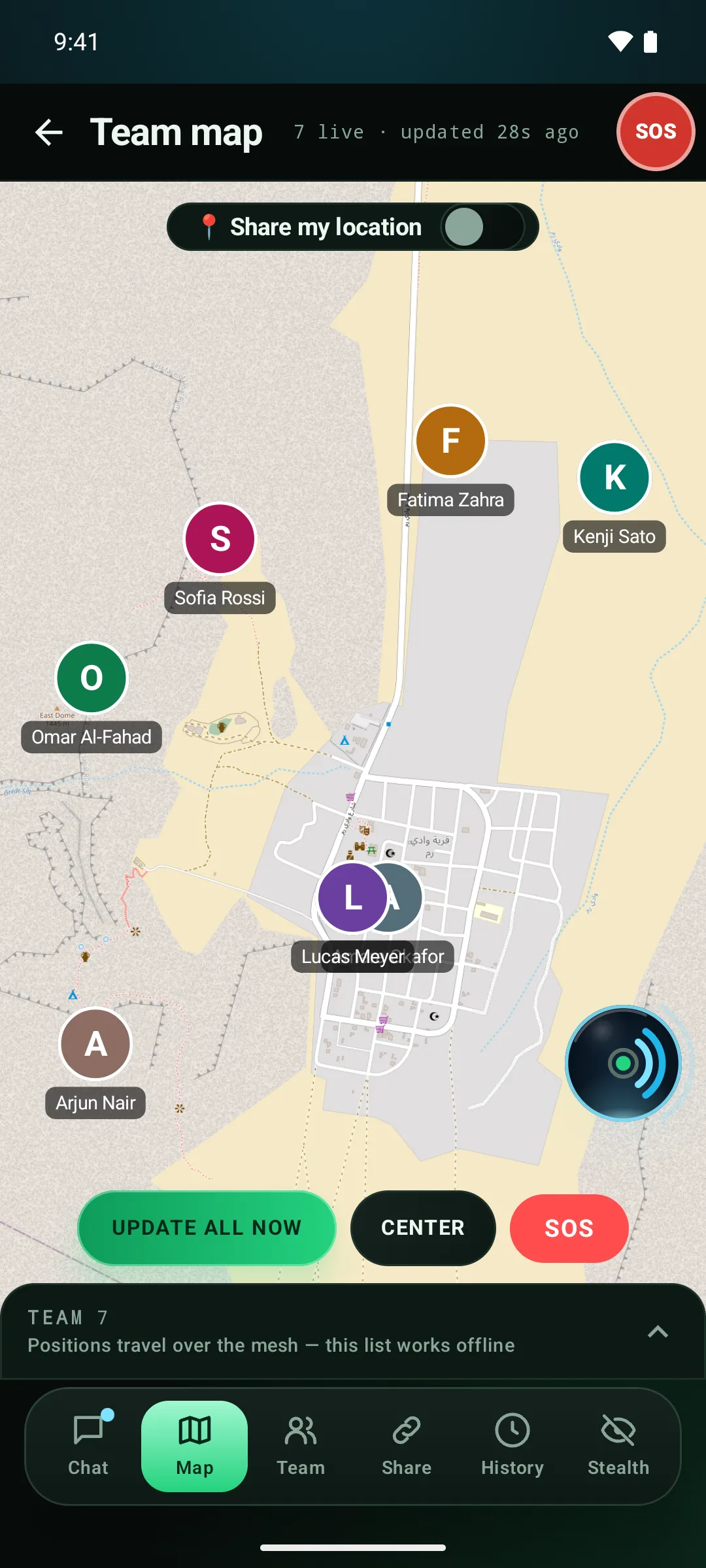
The team map is off by default. Each person chooses to share, and how often it updates: every 30 seconds to every 5 minutes.
Set a talk key
In Settings, choose Volume Up, Volume Down or a physical PTT key, so you can talk with gloves on and the phone in a chest pocket.
Hold to talk on the trail
Press, speak, release. With signal it reaches anywhere; without it, phones within range keep talking.
A day on the trail
A group of trekkers leaves the trailhead at first light. The leader walks at the front, a sweeper walks at the back, and a contact at home has the same channel open in the web app. Two of the group share their position on the team map; the rest leave it off.
The path climbs into a valley and the signal fades. The leader holds the volume key to say the stream crossing ahead is slippery. The group hears it over Bluetooth and Wi-Fi, phone to phone, and the positions of the two who share keep moving on the map.
At a fork, the sweeper sees that one trekker has taken the wrong path and calls the group to wait. The leader opens the field toolkit, reads the coordinates in MGRS and copies them into a message for later. At the top, the phones find signal again: History syncs, and the contact at home can replay the day.
A radio, a compass and a logbook in one
- True-north compass, GPS and barometric altitude, and speed.
- Your position in DD, DMS, UTM and MGRS, with one-tap copy, in the format a rescuer asks for.
- A private team map of the people who choose to share.
- History keeps every transmission with its real audio, to replay at camp.
- Positions keep flowing between nearby phones when there is no network.
Roles on the channel
| Role | Where they walk | What they do on the channel |
|---|---|---|
| Leader | At the front | Calls the pace, hazards and rest stops |
| Sweeper | At the back | Says when the last person is through, and calls a halt if someone drops behind |
| Navigator | Anywhere | Reads coordinates from the field toolkit and checks the route |
| Base contact | At home or in the lodge, in the web app | Hears the group whenever it is in signal, and replays History later |
Talking with no bars
In a valley or on a ridge with no mobile network, Android phones near each other link directly over Bluetooth and Wi-Fi, so the group keeps talking and positions keep moving. Everything syncs when the network returns.
Offline talking is Android to Android. The web app and iPhone need mobile data or Wi-Fi. Spread the Android phones along the group, front, middle and back, so nobody drifts out of reach.
Safety on the mountain
SOS sits in the same place on every screen. Where SOS is live (Kerala today), one tap alerts the channel and your emergency contact with your location, and Silent SOS works when you cannot speak.
TapHAIL keeps your crew talking. It does not replace emergency services: in an emergency, call your local emergency number.
Questions
Can I use my phone as a walkie talkie when trekking?
Yes. Put TapHAIL on the group's phones and join one channel. With signal your voice reaches the whole group anywhere; without it, Android phones near each other keep talking over Bluetooth and Wi-Fi.
Does the team map work offline?
Positions keep flowing between nearby Android phones when there is no network, and the map catches up when the network returns. The map is off by default; each person chooses to share.
Which coordinate formats does TapHAIL show?
DD, DMS, UTM and MGRS, with one-tap copy, plus GPS and barometric altitude.
Can someone at home follow the trek?
Yes, whenever the group is in signal: they open the channel in the web app and hear it. When the group comes back into coverage, History syncs and they can replay what was said.
Should we still carry other emergency kit?
Yes. TapHAIL keeps the group talking, but it does not replace emergency services, so carry whatever your route and the local rules call for.
Can I talk with gloves on?
Yes. Set Volume Up, Volume Down or a physical PTT key as the talk button in Settings, or slide up to lock the button for hands-free talk.
Is TapHAIL free?
Yes. The app is free on Google Play, as a direct download and in the browser, with no ads and nothing locked.